

Introduction
This guide will help you use the Shodan API through n8n to automate security monitoring and threat intelligence workflows. n8n is a workflow automation platform that lets you connect Shodan with hundreds of other services to create powerful automation workflows.
Prerequisites
- n8n: installed on Cloud, Docker, or locally
- Shodan API Key: You'll need a Shodan API key. You can get one by signing up on the Shodan website. A free tier is available, but paid plans offer more credits and capabilities.
Installation
Community Nodes (Recommended)
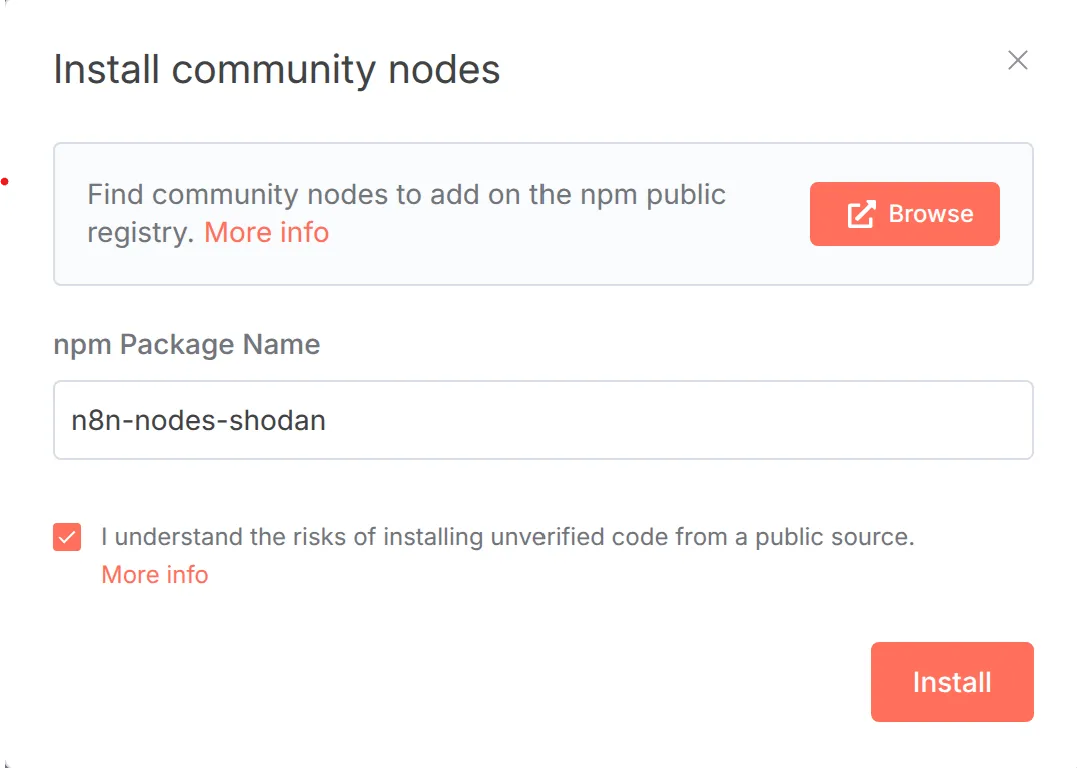
Go to Settings > Community Nodes in n8n
Select Install
Enter
n8n-nodes-shodanin the npm package name fieldAgree to the risks and select Install
Manual Installation
For self-hosted installations:
npm install n8n-nodes-shodanFor Docker deployments, add to your Dockerfile:
RUN cd /usr/local/lib/node_modules/n8n && npm install n8n-nodes-shodanSetup Credentials
In n8n, go to Credentials in the left sidebar
Click Add Credential and search for "Shodan API"
Enter your API key and click Save
Available Operations
Host
- Get: Returns all services found on a given IP address
Search
- Query: Search Shodan using filters (e.g.,
apache country:US) - Count: Get total results matching a query
DNS
- Resolve: Look up IP addresses for hostnames
- Reverse: Look up hostnames for IP addresses
Domain
- Get Info: Get subdomains and DNS entries for a domain
Usages
1. Monitor Your Infrastructure
Monitor your IP ranges for exposed services:
Add a Schedule Trigger node (set to run daily)
Add a Shodan node:
- Resource: Search
- Operation: Query
- Query:
net:192.168.1.0/24
Add a Slack or Email node to send alerts
2. Vulnerability Assessment
Search for devices with known vulnerabilities:
Add a Manual Trigger node
Add a Shodan node:
- Resource: Search
- Operation: Query
- Query:
product:nginx vuln:CVE-2021-44228
Add a Google Sheets node to store findings
3. Asset Discovery
Discover all internet-facing assets for an organization:
Add a Manual Trigger node
Add a Shodan node:
- Resource: Search
- Operation: Query
- Query:
org:"Company Name"
Add another Shodan node:
- Resource: Host
- Operation: Get
- IP Address:
{{$json["ip_str"]}}
Add a database node to store the inventory
4. DNS Reconnaissance
Perform DNS reconnaissance on a domain:
Add a Manual Trigger node
Add a Shodan node:
- Resource: Domain
- Operation: Get Info
- Domain:
example.com - (Optional) Enable History for historical data
Add a Shodan node for IP resolution:
- Resource: DNS
- Operation: Resolve
- Use subdomain results from previous node
Search Query Syntax
Common Shodan filters you can use:
country:US- Filter by countryport:22- Filter by portorg:Google- Filter by organizationproduct:nginx- Filter by productos:Windows- Filter by OScity:"Los Angeles"- Filter by citynet:8.8.8.0/24- Filter by networkvuln:CVE-2021-44228- Filter by CVE
Combine multiple filters:
apache country:US port:443 city:"New York"